Choose your goal
Get help with a PM CV, an interview, development or a career conversation. Home, My work, Prepare and Plan give each part of the journey a clear place.


PM Career Proof
For project managers
Version 1.7.1 is available on the App Store and Google Play
PM-focused help with CVs, interviews, development and career conversations.
Choose a career goal, select the experience you want to use and review an editable draft. Built-in AI is available to eligible pilot accounts.
Download version 1.7.1 for iPhone or Android. Import your CV, review the details and use your project examples to prepare for your next career conversation.
Inside version 1.7.1
Choose a goal. Select your details. Answer focused questions. Review the exact text before sending it to AI, then edit and save your draft.
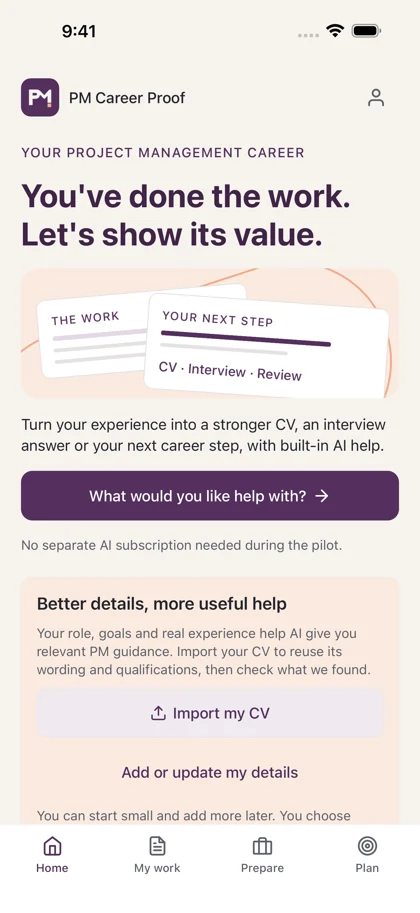
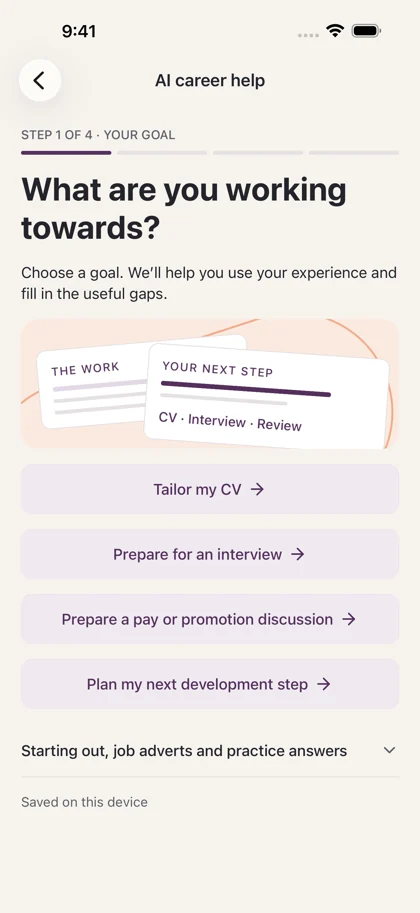
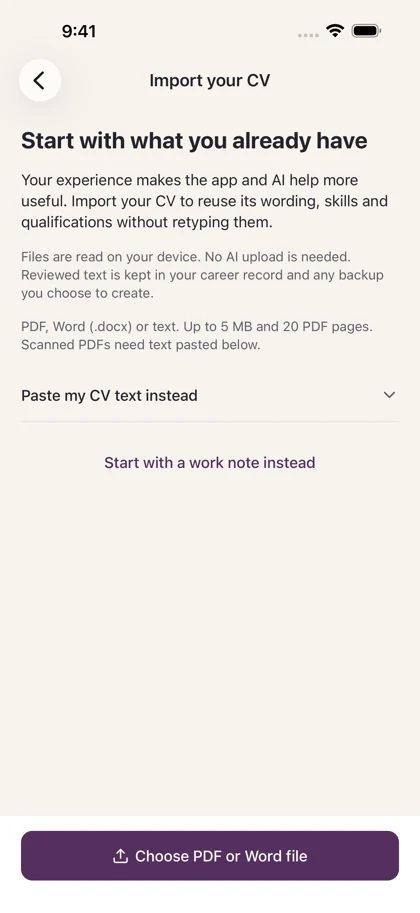
Get help with a PM CV, an interview, development or a career conversation. Home, My work, Prepare and Plan give each part of the journey a clear place.
Import and review CV sections and qualifications, save the details and return to AI. You can work from your CV without duplicating it as work notes.
Select the profile, CV and work details relevant to your goal. Clear checkboxes and a separate Save action make your choices easier to follow.
Focused questions help clarify your experience and what you need. Keep the story grounded in what you actually did.
Review the exact selected text and give permission before it goes to OpenAI. Your contact details and raw CV file are excluded from the request.
Edit the suggested wording before explicitly adding or saving it. Undo is available after the action, so you stay in control of your career record.
Built-in AI sends only the selected text you review and consent to share with OpenAI. Contact details and the raw CV file are excluded from AI requests. The pilot permits up to 25 confirmed accounts, five AI actions a day and 20 per account, subject to its shared usage limit. The current pilot ends on 25 November 2026. Review each suggestion before using it. Core career planning and the free website tools are available without joining the AI pilot.
Recruiters, trainers and coaches can help review how useful the outputs are. Your private CV and career records are not automatically shared with them or a community.
Ask about the pilotWe will confirm availability and device requirements before sending an invitation. Future AI allowances and pricing will be confirmed after testing.
The career record behind the AI
Choose a target role and identify skills and experience to develop, with suggestions for your industry and country.
Note the situation, your responsibilities and the action you took. Add the outcome and what you learned when you know more.
Draw on your saved examples when preparing a CV, an interview answer, a performance review or a discussion with your manager.
From your first role to greater responsibility
For a first project management role, start with examples from work, study or volunteering. As a project manager, record decisions, responsibilities and results. For a senior or lead role, include examples of leading teams and managing more complex work.
Job titles and responsibilities vary between organisations. Compare your experience with the requirements of the role you want.
Free career tools
Write a work example, prepare a message for an AI service or choose a development action. No account or download needed.
Build a note to copy and keep. Only “What happened?” is required. Leave the outcome blank if you do not know it yet.
The sample is fictional. Replace it with your own experience.
Your work example
Save examples in the app and return to them when preparing for an interview or review.
Get the app for saved work examplesChoose a task and add any details you want to include. Review and copy the message, then paste it into an AI service you are allowed to use. You can leave fields blank; the message asks the AI to check missing information with you.
Ready to copy
Choose the role or change you are working towards. The checklist suggests experience to record and discuss with your manager or mentor.
Use this alongside a real job description or your employer’s framework. It is a starting point, not a competence assessment.
Examples to look for
Choose one skill or area of experience to develop, and agree an opportunity to work on it.
Build your plan in Career ProofYour entries are used only in this page and are not saved by the website, sent to analytics or passed to an AI service. Copy anything you want to keep before leaving. The mobile app keeps its own saved records; this page does not add to them. Use fictional or non-confidential details.
Existing external AI toolkit
Prepare instructions for an AI service to help with a CV, interview answer or performance review. You choose the examples to include and check the response.
Pick the task and add your role, country and industry.
Check that the instructions describe what you need, and add work examples you are allowed to share.
Open ChatGPT, Copilot, Gemini or Claude. Paste the message and work through the answer there.
On iPhone, one achievement-finding tool is free. The full Toolkit is included while Career Pro is active, or available as a separate one-time purchase where offered. Your app shows availability and pricing.
This external toolkit is separate from the built-in AI pilot. Its conversations happen in your chosen service; external AI subscriptions are not included. Use your employer’s approved AI service for work information and follow its rules.
Try the free AI prompt builderCreate a career plan and save as many work examples as you need for free. Pro adds interview practice and tools to prepare for reviews and meetings.
| Tool | Free | Pro |
|---|---|---|
| Career plan and core development suggestions | Included | Included |
| Unlimited saved work examples | Included | Included |
| Interview preparation and practice | Not included | Included |
| 1-to-1 preparation and career-summary PDF | Not included | Included |
| Manager feedback, custom capabilities and supported framework CSV import | Not included | Included |
| Full PM Coach, strongest achievements, role explanations and detailed progression history | Not included | Included |
| AI Career Toolkit on iPhone | One achievement-finding tool | Full Toolkit while subscribed |
Every Career Pro subscription includes the same Pro features. Your saved work examples remain available if your subscription ends.
Any introductory offer applies only when your store shows it for your account. Check its billing period, eligibility and renewal price before confirming.
| Billing period | Price |
|---|---|
| Monthly | £5.99 every month |
| Six months | £24.99 every six months |
| Annual | £39.99 every year |
Subscriptions renew automatically unless cancelled in your App Store or Google Play settings. Your store shows the final local price, any eligible introductory offer and renewal terms before purchase. Store availability may vary by country.
Create a career plan and save work examples in the app. You can also try the website tools without an account or download. Pro preparation tools are optional.
No. Planning your development and recording work examples do not depend on AI. The existing external Toolkit prepares prompts for a service you choose, which may charge separately. On iPhone and Android, eligible pilot accounts can also request built-in AI suggestions.
No. Keep examples for CV updates, reviews and development conversations as well as interviews. Record your own contribution and results you can support.
Ask whether your employer will reimburse an individual app-store purchase. Confirm its policy before buying. Purchases and subscriptions remain managed through your own store account.
Download the app to keep your work examples and career plan together. Planning and recording examples are free; Pro preparation tools are optional.
Career guidance is not a promise of a job or promotion. Only record and share information you are authorised to use.
Download an original evidence worksheet, then use Import framework CSV in the app’s capability framework screen with Pro. Choose the relevant capability when recording a work example. The five levels are the app’s reflection scale. Only select a level you can support with your own experience.
Skythorn wrote these prompts for practice. They do not reproduce official assessment levels or award PDUs, qualifications or certification. Sources: APM Competence Framework and PMI Talent Triangle.